
What are Safeties, Countdown Bars and Pacer Bars?Updated 3 months ago
If you are creating your own content and want to drive it with the Muséik software then you will need to understand about Safeties and Countdown Bars.
The basic idea behind these tools is that Muséik follows the tempo of the live event, no matter what the performers decide to do in real time. There are some spots where anticipating what the live performers will do is very difficult. A musical fermata (hold) is a good example. Some performances may take a long hold, others may skip it entirely. The files we build need to be able to accommodate either artistic decision - and everything in between.
To do this we use Safeties and Count Down Bars. Each serves a different purpose.
SAFTIES
A Safety is an area in the Stage Sync™ file where the scrolling score has a shaded grey box overlaid on it. They commonly occur at a fermata, a grand pause, or between sections of music. In the image below, taken from "Suffrage Canata" (score by Andrea Ramsey, film by Vox Femina) there is a fermata in bar 54. A Safety has been inserted during beat three in that measure. The Safety ends just before beat four in measure 54. In the live performance the software operator cannot know how long the fermata will last, but needs to be ready to deliver the critical sync point on beat four no matter what.
To accomplish this we will remove a bit of material from the source audio file between beat three and four, shortening the sync audio that you hear in the Stage Sync™ file. By cutting that material the Muséik file will likely arrive at beat four before the live performers do. The operator will pause the Show File just before beat four and wait for the live performance to catch up. When beat four arrives the operator simply hits play and the critical sync point is perfectly synchronized.
Here's what that means to you as the film maker:
Any time a grey Safety appears in the Stage Sync™ file you know that the software operator will likely hit pause on the Show File. That means that your audio and video materials must be static during that time. Video should fade to black, white or some other color, or be a still image. Audio should be silent during a Safety. That way when the file is paused the audience's attention will not be draw to an awkward pause in the digital media.
You do not NEED to follow this rule. With practice the operator will discover that the film or audio play through the Safety which means they cannot pause the file at that spot. But we encourage you to be nice to the operator if at all possible. It is very difficult to sync a fermata or grand pause without hitting pause and we think a Safety is a pretty easy compromise between your needs as the film maker and the operator's needs in live performance.
NOTE: Backing tracks are a unique case. It may not be practical to have an audio file go silent in a way that accommodates the Safety. Or the time we trim from the sync audio around a Safety may seriously impact your audio tracks. In these cases you are welcome to contact us and we can customize the Stage Sync™ for your needs.
COUNTDOWN BARS
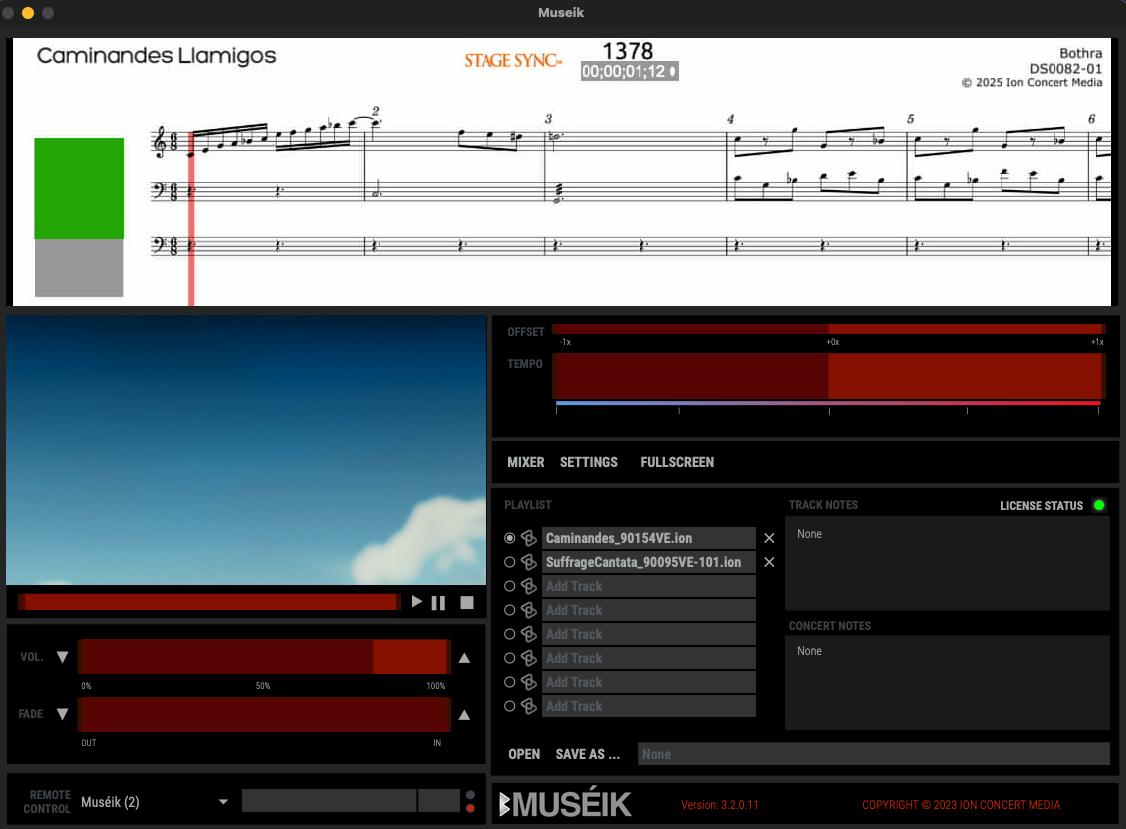
Countdown Bars serve a different purpose in Muséik. They are green bars that appear in the Stage Sync™ file outside of the scrolling score. As the file plays the green bar shrinks until it disappears. It appears at places where there is time-based action on stage that is not related to the information in the Stage Sync™. Examples might be the time between musical movements, spoken dialog, or other stage actions. While a Safety tells an operator to pause the file, a green Countdown Bar tells them to let the file play. You are welcome to add motion or audio to your digital media files during a Countdown Bar.
Some common examples include a title screen that fades up before the music starts, live narration that takes place between musical sections, or action in the film that occurs without scoring. In the image below there is a green Countdown Bar on top of a gray Safety. In this case the title screen plays in during the Countdown Bar, then goes static at the Safety. The operator will play through the Countdown Bar and then pause at the Safety. When the ensemble begins to play the operator will resume playing the file.

PACER BARS
Pacer Bars are green bars that appear horizontally in place of a musical score. They are commonly used when the music is fairly straightforward of the sync is not precise. They function just like a score in that the operator will use them to keep the sync in real time. But instead of reading notes, the operator will simply adjust tempo to line up periodic cue points (often the beginning of a phrase).