
Pitch ShiftUpdated 3 months ago
Muséik has the ability to transpose your audio files up or down by as much as a Major third.
The Global pitch Shift control is located in the Audio section in the SETTINGS window.
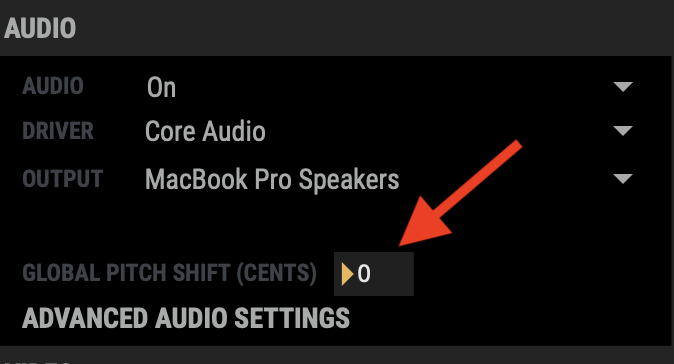
It calculates pitch in cents and is set to zero (0) cents by default.
The user can use a mouse to click on the number and drag up or down to transpose the audio playback.
To calculate specific musical intervals use this chart:
| INTERVAL | CENTS SETTING |
| M3 up | 400 |
| m3 up | 300 |
| M2 up | 200 |
| m2 uo | 100 |
| No change | 0 |
| m2 down | -100 |
| M2 down | -200 |
| m3 down | -300 |
| M3 down | -400 |